
 Dmitry Nefedov
1f10e2a4a1
Dmitry Nefedov
1f10e2a4a1
|
2 months ago | |
|---|---|---|
| .github | 2 months ago | |
| Cursors | 3 months ago | |
| Scripts | 3 months ago | |
| Wrapper | 2 months ago | |
| chocolatey | 3 months ago | |
| img | 3 months ago | |
| src | 2 months ago | |
| .gitattributes | 8 years ago | |
| .gitignore | 12 months ago | |
| CHANGELOG.md | 3 months ago | |
| CODE_OF_CONDUCT.md | 4 years ago | |
| Download_Latest_Sophia.ps1 | 3 months ago | |
| Download_Sophia.ps1 | 3 months ago | |
| LICENSE | 3 years ago | |
| README.md | 2 months ago | |
| README_de-de.md | 2 months ago | |
| README_ru-ru.md | 2 months ago | |
| README_uk-ua.md | 2 months ago | |
| ReleaseNotesTemplate.md | 3 months ago | |
| sophia_script_versions.json | 3 months ago | |
| supported_windows_builds.json | 3 months ago | |
README.md
🌐 English | Deutsche | Русский | Українська
Sophia Script for Windows
The most powerful PowerShell module for fine-tuning Windows on GitHub
Made with  of Windows


Key features
- More than 150 unique functions to configure Windows using Microsoft's officially documented ways without making any harm to it
- Every tweak has its corresponding function to restore default settings
- Configure Windows AI
- Configure Windows privacy, security, personalization
- Fully open-source project
- All archives are being built and uploaded using GitHub Actions
- Available via Scoop, Chocolatey, and WinGet
- Supports ARM64 and PowerShell 7
- Has no conflict with VAC
- Uninstall UWP apps displaying their localized packages names
- Script generates installed UWP apps list dynamically
- Display applied registry policies in the Local Group Policy Editor snap-in (gpedit.msc)
- Enable DNS-over-HTTPS using
- Uninstall OneDrive
- Interactive prompts and popups
- TAB completion for functions and their arguments (using Import-TabCompletion.ps1)
- Change location of the user folders (without moving user files) using an interactive menu
- Desktop
- Documents
- Downloads
- Music
- Pictures
- Videos
- Install free (light and dark)
Windows 11 Cursors Concept v2cursors from Jepri Creations on-the-fly- Archive was downloaded to Cursors folder using DeviantArt API
- Set an app as default one for specific extension without "How do you want to open this" pop-up
- Export and import all Windows associations. You need to install all apps according to exported JSON file to restore all associations
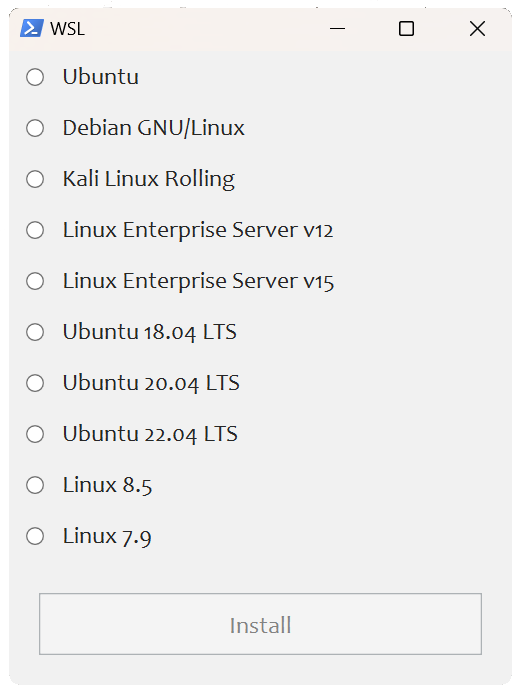
- Install WSL Linux distribution with pop-up using friendly distro names
- Create scheduled tasks with a native toast notification, where you will be able to run or dismiss tasks
- Create scheduled tasks
Windows CleanupandWindows Cleanup Notificationfor cleaning up Windows of unused files and Windows updates files - Create a scheduled task
SoftwareDistributionfor cleaning up%SystemRoot%\SoftwareDistribution\Download - Create a scheduled task
Tempfor cleaning up%TEMP%
- Create scheduled tasks
- Install the latest provided Microsoft Visual C++ 2015–2026 x86/x64
- Install the latest provided .NET Desktop Runtime 8, 9, 10 x64
- Many more File Explorer and context menu tweaks
Table of Contents
- Key features
- How to download
- How to use
- Donations
- System Requirements
- Screenshots
- Videos
- How to translate
- Media
- SophiApp 2
How to download
From release page
| Windows 10 | Windows 11 |
 |
 |
 |
 |
 |
 |
 |
 |
 |
|
 |
|
Download via PowerShell
Download and expand to Downloads folder the latest Sophia Script for Windows version depending to your Windows and PowerShell versions you use.
iwr script.sophia.team -useb | iex
Download and expand to Downloads folder the latest Sophia Script for Windows version from the last commit depending to your Windows and PowerShell versions you use.
iwr sl.sophia.team -useb | iex
Download via Chocolatey
Download and expand to Downloads folder latest Sophia Script for Windows version depending to your Windows version you use.
choco install sophia --force -y
Download and expand to Downloads folder latest Sophia Script for Windows version for PowerShell 7 depending to your Windows version you use.
choco install sophia --params "/PS7" --force -y
# Uninstall and then remove downloaded folder manually
choco uninstall sophia --force -y
Download via WinGet
https://github.com/microsoft/winget-cli
Download and expand to Downloads folder latest Sophia Script for Windows version for Windows 11 and PowerShell 5.1 (SFX archive sophiascript.exe).
$DownloadsFolder = Get-ItemPropertyValue -Path "HKCU:\Software\Microsoft\Windows\CurrentVersion\Explorer\User Shell Folders" -Name "{374DE290-123F-4565-9164-39C4925E467B}"
winget install --id TeamSophia.SophiaScript --location $DownloadsFolder --accept-source-agreements --force

& "$DownloadsFolder\sophiascript.exe"
# Uninstall Sophia Script for Windows
winget uninstall --id TeamSophia.SophiaScript --force
Download via Scoop
Download and expand to Downloads folder latest Sophia Script for Windows version for Windows 11 for PowerShell 5.1.
# scoop bucket rm extras
scoop bucket add extras
scoop install sophia-script --no-cache
# Uninstall Sophia Script for Windows
scoop uninstall sophia-script --purge
How to use
- Download archive and expand it
- Look through the
Sophia.ps1file to configure functions that you want to be run- Place the
#char before function if you don't want it to be run. - Remove the
#char before function if you want it to be run.
- Place the
- Copy the whole path to
Sophia.ps1- On
Windows 10press and hold the Shift key, right click onSophia.ps1, and click onCopy as path - On
Windows 11right click onSophia.ps1and click onCopy as path.
- On
- Open
Windows PowerShell- On
Windows 10clickFilein the File Explorer, hover overOpen Windows PowerShell, and selectOpen Windows PowerShell as Administrator(how-to with screenshots) - On
Windows 11right-click on the Windows icon and openWindows Terminal (Admin)
- On
- Set execution policy to be able to run scripts only in the current PowerShell session
Set-ExecutionPolicy -ExecutionPolicy Bypass -Scope Process -Force
- Type
.\Sophia.ps1and press Enter
.\Sophia.ps1
Windows 11
https://github.com/user-attachments/assets/2654b005-9577-4e56-ac9e-501d3e8a18bd
Windows 10
https://github.com/user-attachments/assets/f5bda68f-9509-41dc-b3b1-1518aeaee36f
How to run the specific function(s)
- Do all steps from How to use section and stop at setting execution policy in
PowerShell - Dot source the
Import-TabCompletion.ps1file first:
# With a dot at the beginning
. .\Import-TabCompletion.ps1
- Сall any script function with name autocompletion using TAB
Sophia -Functions<TAB>
Sophia -Functions temp<TAB>
Sophia -Functions unin<TAB>
Sophia -Functions uwp<TAB>
Sophia -Functions "DiagTrackService -Disable", "DiagnosticDataLevel -Minimal", Uninstall-UWPApps

Uninstall-UWPApps, "PinToStart -UnpinAll"
https://github.com/user-attachments/assets/b7ba9ff5-fa3f-481c-a91f-d8bac5631a56
Wrapper

Read more here
- Download the latest Wrapper version
- Expand archive
- Run
SophiaScriptWrapper.exeand importSophia.ps1Sophia.ps1has to be inSophia Scriptfolder- The Wrapper has a real time UI rendering
- Configure every function
- Open the
Console Outputtab and pressRun PowerShell.
How to revert changes
- Do all steps from How to use section and stop at setting execution policy in
PowerShell - Dot source the
Import-TabCompletion.ps1file first:
# With a dot at the beginning
. .\Import-TabCompletion.ps1
- Call functions from
Sophia.ps1you want to revert like this.
Sophia -Functions "DiagTrackService -Enable", Uninstall-UWPApps
Donations


System Requirements
| Version | Build | Edition |
|---|---|---|
| Windows 11 24H2/25H2+ | Latest stable | Home/Pro/Enterprise |
| Windows 10 x64 22H2 | Latest stable | Home/Pro/Enterprise |
| Windows 11 Enterprise LTSC 2024 | Latest stable | Enterprise |
| Windows 10 x64 21H2 Enterprise LTSC 2021 | Latest stable | Enterprise |
| Windows 10 x64 1809 Enterprise LTSC 2019 | Latest stable | Enterprise |
Screenshots
Localized UWP packages names

Download and install any supported Linux distribution in automatic mode
Native interactive toasts for the scheduled tasks

Videos
How to translate
- Get your OS UI culture by invoking
$PSUICulturein PowerShell - Create a folder with the UI culture name
- Place your localized SophiaScript.psd1 file into this folder.
Media
- XDA
- 4sysops
- gHacks
- Neowin
- Comss.ru
- Habr
- Deskmodder.de
- PCsoleil Informatique
- Reddit (archived)
- PM me
- Ru-Board
- rutracker
- My Digital Life
SophiApp 2.0 (C# + WinUI 3)
SophiApp 2.0 is in ongoing development. 🚀

